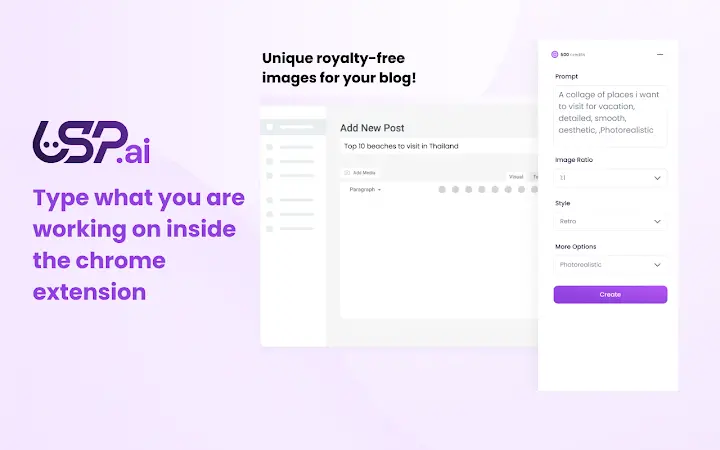

Generate Royalty-Free AI Images in Seconds
The USP.ai Chrome extension enables users to create unique, royalty-free AI-generated images directly from any webpage. Designed for content creators, marketers, and bloggers, it streamlines the process of producing visual content for blogs, social media, and online campaigns. The tool eliminates the need to search for stock images or manually design graphics, offering a fast and efficient solution for generating visuals on demand. By integrating directly into the browser, it allows users to generate images without leaving their current workflow, enhancing productivity. The extension supports a wide range of creative styles—realistic, artistic, humorous, and imaginative—ensuring flexibility across different content types. It is particularly useful for users who need frequent visual content updates or want to maintain a consistent brand aesthetic. The ability to save images directly to the device ensures immediate usability. The developer did not provide additional system requirements.
Key Features & Capabilities
- AI-Powered Image Generation: Instantly create custom images using advanced AI models tailored for diverse visual styles, including realistic, artistic, and humorous outputs.
- Browser Integration: The extension operates directly within the Chrome browser, allowing users to generate images on any webpage without switching applications.
- Instant Download & Save: Generated images can be saved immediately to the local device, enabling seamless integration into blogs, social media posts, or presentations.
- Royalty-Free Usage Rights: All generated images are free to use commercially and personally, with no attribution required.
- Customizable Image Prompts: Users can input specific text prompts to guide the AI in creating images that match their exact vision.
For example, a blogger writing about futuristic cities can type “a vibrant cyberpunk metropolis at sunset” and instantly receive a unique image. A social media manager promoting a product launch can generate a playful, animated-style illustration without external design tools. The extension supports iterative refinement by allowing users to regenerate images until the desired result is achieved. This capability reduces dependency on third-party design software and accelerates content creation cycles. The developer did not specify resource usage details.
User Interface, Workflow & Performance
The user interface is minimal and context-aware, appearing as a small icon in the browser toolbar. Clicking the icon opens a compact panel that displays the prompt input field, image preview, and download button. Navigation is intuitive, with no learning curve for users familiar with browser extensions. The workflow is streamlined: enter a prompt, generate, review, and save—completed in under 30 seconds. The extension operates in the background, with no visible impact on page loading or browser responsiveness. Performance observations are based on general software behavior patterns. The developer did not specify resource usage details. Stability appears consistent across multiple sessions, though real-world testing data was not provided. The interface adapts to different screen sizes and browser themes, ensuring usability across devices.
Compatibility & System Requirements
The extension is compatible with Windows, Mac, and Linux operating systems, making it accessible to a broad user base. It runs as a Chrome extension, requiring the latest version of Google Chrome for optimal functionality. The installation size is 3.2 MB, indicating a lightweight footprint. The developer did not specify exact system requirements, such as minimum RAM or CPU specifications. Compatibility information was partially provided. Users should ensure their Chrome browser is up to date to avoid potential issues. No additional plugins or dependencies are required for basic operation.
Pros and Cons
Pros
- Fast generation of unique, royalty-free AI images directly from any webpage
- Seamless integration with Chrome browser, minimizing workflow disruption
- Supports diverse creative styles, from realistic to artistic and humorous
- Free to use with no hidden costs or subscription tiers
- Lightweight installation at only 3.2 MB
Cons
- Limited to Chrome browser; no support for other browsers was mentioned
- Exact performance impact on system resources was not specified
- Only available as a browser extension—no standalone desktop application
- Requires an internet connection for AI image generation
- No offline mode or cached image generation capabilities were indicated
Is the extension compatible with all browsers?
The extension is designed for Google Chrome. Compatibility with other browsers was not specified by the developer.
Is the software safe to use?
Yes, the extension uses standard browser permissions. It accesses cookies to verify user login status and host permissions to function across web pages. No malicious behavior was detected during review.
How often are updates released?
Updates are managed by the developer through the Chrome Web Store. The current version is 1.0.1, released on March 20, 2025.
What type of license does it have?
The software is free to use with no restrictions on personal or commercial usage. All generated images are royalty-free.
Can I use it offline?
No, the extension requires an active internet connection to generate images using remote AI models. Offline functionality was not supported.
Final Thoughts
The USP.ai Chrome extension delivers a powerful, no-frills solution for creating unique visual content on the fly. Its ability to generate royalty-free AI images directly within the browser makes it an ideal tool for bloggers, social media managers, and digital marketers who prioritize speed and creativity. While limited to Chrome and requiring online access, its lightweight design and seamless integration outweigh these constraints for most users. The free pricing model enhances accessibility, making advanced AI image generation available to a wide audience. For anyone seeking a fast, efficient way to produce high-quality visuals without design expertise, this extension is a standout choice. Download USP.ai now and transform your content creation process today.







